 FsCDK
FsCDK
OAuth 2.0 Machine-to-Machine Authentication with Cognito
Implement secure service-to-service authentication using Cognito User Pools, OAuth 2.0 scopes, and Lambda authorizers.
OAuth 2.0 M2M Flow
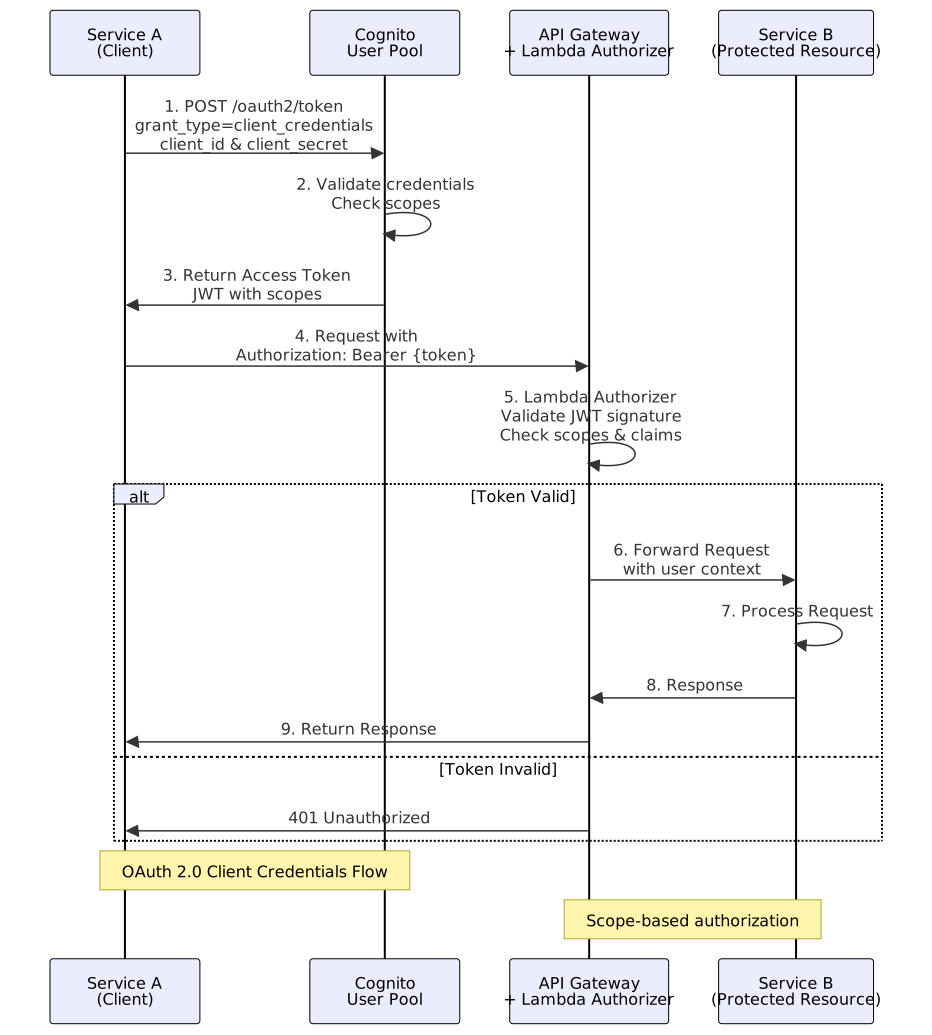
Architecture Overview
Traditional User Auth: User → Cognito → JWT → API Gateway → Lambda M2M Auth: Service → OAuth Client Credentials → Access Token → API Gateway → Lambda
OAuth Resource Server with Custom Scopes
Define business-specific scopes for your API:
#r "../src/bin/Release/net8.0/publish/Amazon.JSII.Runtime.dll"
#r "../src/bin/Release/net8.0/publish/Constructs.dll"
#r "../src/bin/Release/net8.0/publish/Amazon.CDK.Lib.dll"
#r "../src/bin/Release/net8.0/publish/FsCDK.dll"

open FsCDK
open Amazon.CDK
open Amazon.CDK.AWS.Cognito
open Amazon.CDK.AWS.Lambda
open Amazon.CDK.AWS.IAM
Basic M2M Setup
Create a Cognito User Pool with OAuth resource server for machine-to-machine authentication:
stack "M2MAuth" {
    // User Pool for both user and M2M authentication
    let! myUserPool =
        userPool "AppUserPool" {
            signInWithEmail
            selfSignUpEnabled false // M2M clients created administratively
        }

    // Define OAuth resource server with custom scopes
    userPoolResourceServer "ApiResourceServer" {
        userPool myUserPool
        identifier "api"
        name "API Resource Server"
        scope "read" "Read access to resources"
        scope "write" "Write access to resources"
        scope "admin" "Administrative operations"
    }

    // Create M2M client
    userPoolClient "ServiceClient" {
        userPool myUserPool
        generateSecret true // Required for client credentials flow

        authFlows (
            AuthFlow(
                UserSrp = false,
                UserPassword = false,
                AdminUserPassword = false
            // Custom = true // For client_credentials grant
            )
        )

        // Short-lived tokens for services
        tokenValidities (
            (Duration.Days 30.0), // refreshToken (not used in client_credentials)
            (Duration.Hours 1.0), // accessToken
            (Duration.Hours 1.0) // idToken
        )
    }
}
Resource Server with Multiple Scopes
Add more scopes to support different permission levels:
stack "CompleteM2MOAuth" {
    let! myUserPool =
        userPool "AppUserPool" {
            signInWithEmail
            selfSignUpEnabled false
        }

    // Resource server with granular scopes
    userPoolResourceServer "ApiResourceServer" {
        userPool myUserPool
        identifier "api"
        scope "read" "Read access to resources"
        scope "write" "Write access to resources"
        scope "delete" "Delete access to resources"
        scope "admin" "Administrative operations"
        scope "execute" "Execute business transactions"
    }
}
Lambda Authorizer for Dual Authentication
Support both user JWT tokens and M2M access tokens:
stack "DualAuthAPI" {
    // Lambda authorizer supporting both token types
    lambda "ApiAuthorizer" {
        runtime Runtime.PYTHON_3_11
        handler "authorizer.handler"
        code "./authorizer"
        timeout 30.0

        environment [ "USER_POOL_ID", "us-east-1_XXXXX"; "REGION", "us-east-1" ]

        // IAM permissions for Cognito
        addRolePolicyStatement (
            policyStatement {
                effect Effect.ALLOW
                actions [ "cognito-idp:DescribeUserPool" ]
                resources [ "arn:aws:cognito-idp:us-east-1:123456789012:userpool/*" ]
            }
        )
    }
}
Authorizer Implementation Pattern
Lambda authorizer implementation to handle both user JWT and M2M access tokens.
Note: Python example shown below as Lambda authorizers commonly use Python/Node.js for JWT validation. The FsCDK builder above shows how to deploy this Lambda function.
|
Obtaining M2M Access Tokens
Services request tokens using client credentials:
|
Using M2M Tokens
|
Scope-to-Role Mapping Strategy
Map OAuth scopes to application-specific business roles:
OAuth Scope |
Application Role |
Permissions |
|---|---|---|
|
|
GET operations only |
|
|
GET, POST, PUT operations |
|
|
All operations including DELETE |
|
|
Execute business transactions |
Token Validation Best Practices
|
Security Considerations
M2M Client Management
- Store client secrets in AWS Secrets Manager (never in code)
- Rotate client secrets regularly (90-day rotation)
- Use separate clients per service/environment
- Implement client credential monitoring and alerts
Token Security
- Short-lived tokens - 1 hour max for access tokens
- Scope principle of least privilege - Only grant needed scopes
- Token monitoring - Log all token requests and usage
- Revocation strategy - Ability to revoke compromised clients
API Gateway Integration
// API Gateway method with authorizer
// (Configuration varies by gateway type - REST vs HTTP)
Cost Considerations
Cognito M2M pricing:
- User Pool - Free tier: 50,000 MAU
- M2M clients - $0.05 per MAU (Monthly Active User)
- Token operations - Included in pricing
- Typical cost - ~$6/month per service client
Monitoring M2M Authentication
CloudWatch metrics to track:
- Token request rate per client
- Failed authentication attempts
- Token validation errors
- Scope usage patterns
Complete M2M Example
// 1. Create User Pool with resource server (see above)
// 2. Create M2M client with client_credentials flow
// 3. Deploy Lambda authorizer
// 4. Configure API Gateway to use authorizer
// 5. Services request tokens and call API
Migration from API Keys
If migrating from API key authentication:
API Keys |
OAuth M2M |
|---|---|
Manual rotation |
Automatic expiration |
Broad access |
Granular scopes |
Simple but risky |
Secure but complex |
No usage attribution |
Client-level tracking |
Migration strategy: 1. Implement M2M alongside API keys 2. Migrate services one-by-one 3. Monitor for 30 days 4. Deprecate API keys
Resources
<summary>Creates an AWS CDK Stack construct.</summary>
<param name="name">The name of the stack.</param>
<code lang="fsharp"> stack "MyStack" { lambda myFunction bucket myBucket } </code>
<summary>Creates a Cognito User Pool with AWS best practices.</summary>
<param name="name">The user pool name.</param>
<code lang="fsharp"> userPool "MyUserPool" { signInWithEmail selfSignUpEnabled true mfa Mfa.OPTIONAL } </code>
<summary>Enables email only as sign-in alias.</summary>
<summary>Enables or disables self sign-up.</summary>
<summary>Creates a builder for a Cognito User Pool Resource Server.</summary>
<param name="name">The logical name for the resource server.</param>
<code lang="fsharp"> userPoolResourceServer "ApiServer" { userPool myUserPool identifier "api" name "API Resource Server" scope "read" "Read access" } </code>
<summary>Sets the user pool associated with this resource server.</summary>
<param name="config">The current resource server configuration.</param>
<param name="pool">The Cognito user pool.</param>
<code lang="fsharp"> userPoolResourceServer "ApiServer" { userPool myUserPool } </code>
<summary>Sets the identifier used by OAuth2 to reference this resource server.</summary>
<param name="config">The current resource server configuration.</param>
<param name="id">The resource server identifier, e.g., <c>api</c> or <c>com.example.api</c>.</param>
<code lang="fsharp"> userPoolResourceServer "ApiServer" { identifier "api" } </code>
<summary>Sets the display name for the resource server.</summary>
<param name="config">The current resource server configuration.</param>
<param name="name">The resource server name.</param>
<code lang="fsharp"> userPoolResourceServer "ApiServer" { name "API Resource Server" } </code>
<summary>Adds a single scope from a name/description tuple.</summary>
<param name="config">The current resource server configuration.</param>
<param name="name">The scope name.</param>
<param name="description">The scope description.</param>
<code lang="fsharp"> userPoolResourceServer "ApiServer" { scope "admin" "Admin access" } </code>
<summary>Creates a Cognito User Pool Client.</summary>
<param name="name">The client name.</param>
<code lang="fsharp"> userPoolClient "MyAppClient" { userPool myUserPool generateSecret false } </code>
<summary>Sets the user pool.</summary>
<summary>Enables or disables secret generation.</summary>
<summary>Sets authentication flows.</summary>
type AuthFlow = interface IAuthFlow new: unit -> unit member AdminUserPassword: Nullable<bool> member Custom: Nullable<bool> member User: Nullable<bool> member UserPassword: Nullable<bool> member UserSrp: Nullable<bool>
--------------------
AuthFlow() : AuthFlow
<summary>Sets token validities.</summary>
<summary>Creates a Lambda function configuration.</summary>
<param name="name">The function name.</param>
<code lang="fsharp"> lambda "MyFunction" { handler "index.handler" runtime Runtime.NODEJS_18_X code "./lambda" timeout 30.0 } </code>
<summary>Sets the runtime for the Lambda function.</summary>
<param name="config">The function configuration.</param>
<param name="runtime">The Lambda runtime.</param>
<code lang="fsharp"> lambda "MyFunction" { runtime Runtime.NODEJS_18_X } </code>
type Runtime = inherit DeputyBase new: name: string * ?family: Nullable<RuntimeFamily> * ?props: ILambdaRuntimeProps -> unit member RuntimeEquals: other: Runtime -> bool member ToString: unit -> string member BundlingImage: DockerImage member Family: Nullable<RuntimeFamily> member IsVariable: bool member Name: string member SupportsCodeGuruProfiling: bool member SupportsInlineCode: bool ...
--------------------
Runtime(name: string, ?family: System.Nullable<RuntimeFamily>, ?props: ILambdaRuntimeProps) : Runtime
<summary>Sets the handler for the Lambda function.</summary>
<param name="config">The function configuration.</param>
<param name="handler">The handler name (e.g., "index.handler").</param>
<code lang="fsharp"> lambda "MyFunction" { handler "index.handler" } </code>
<summary>Sets the code source from a Code object.</summary>
<param name="config">The function configuration.</param>
<param name="path">The Code object.</param>
<code lang="fsharp"> lambda "MyFunction" { code (Code.FromBucket myBucket "lambda.zip") } </code>
<summary>Sets the timeout for the Lambda function.</summary>
<param name="config">The function configuration.</param>
<param name="seconds">The timeout in seconds.</param>
<code lang="fsharp"> lambda "MyFunction" { timeout 30.0 } </code>
<summary>Sets environment variables for the Lambda function.</summary>
<param name="config">The function configuration.</param>
<param name="env">List of key-value pairs for environment variables.</param>
<code lang="fsharp"> lambda "MyFunction" { environment [ "KEY1", "value1"; "KEY2", "value2" ] } </code>
<summary>Adds a single role policy statement.</summary>
<param name="config">The function configuration.</param>
<param name="statements">Policy statement.</param>
<code lang="fsharp"> lambda "MyFunction" { addRolePolicyStatement stmt } </code>