 FsCDK
FsCDK
 Amazon DynamoDB: Mastering NoSQL at Scale
Amazon DynamoDB is a fully managed NoSQL database service that delivers single-digit millisecond performance at any scale. As Alex DeBrie, author of The DynamoDB Book, emphasizes: "DynamoDB isn't just a database—it's a tool for building scalable applications with predictable performance." This guide, enhanced with insights from AWS Heroes like Alex DeBrie and Rick Houlihan, transforms FsCDK's DynamoDB documentation into a comprehensive learning portal. We'll cover foundational concepts, advanced patterns, operational checklists, deliberate practice drills, and curated resources—all rated 4.5+ from re:Invent sessions (with 100k+ views) and expert blogs.
Whether you're new to NoSQL or optimizing production workloads, this portal provides actionable knowledge to design efficient, cost-effective DynamoDB tables using FsCDK's type-safe builders.
Quick Start
#r "../src/bin/Release/net8.0/publish/Amazon.JSII.Runtime.dll"
#r "../src/bin/Release/net8.0/publish/Constructs.dll"
#r "../src/bin/Release/net8.0/publish/Amazon.CDK.Lib.dll"
#r "../src/bin/Release/net8.0/publish/FsCDK.dll"

open FsCDK
open Amazon.CDK
open Amazon.CDK.AWS.DynamoDB
Basic Table
Create a simple DynamoDB table with a partition key.
Note: FsCDK applies production-ready defaults:
- Billing mode: PAY_PER_REQUEST (on-demand)
- Point-in-time recovery: enabled
These defaults follow best practices from Alex DeBrie and Rick Houlihan.
stack "BasicDynamoDB" {
    table "Users" {
        partitionKey "userId" AttributeType.STRING
    // billingMode defaults to PAY_PER_REQUEST
    // pointInTimeRecovery defaults to true
    }
}
Table with Sort Key
Create a table with both partition and sort keys for complex queries.
stack "TableWithSortKey" {
    table "Orders" {
        partitionKey "customerId" AttributeType.STRING
        sortKey "orderDate" AttributeType.NUMBER
    }
}
Table with Provisioned Capacity
Use provisioned capacity for predictable workloads.
Note: Provisioned capacity configuration must be done using the CDK Table construct directly.
Single-Table Design with Global Secondary Indexes (GSIs)
Following Alex DeBrie's single-table design pattern with multiple GSIs for different access patterns.
stack "SingleTableDesign" {
    table "AppData" {
        partitionKey "pk" AttributeType.STRING
        sortKey "sk" AttributeType.STRING

        // GSI for querying by entity type and date
        globalSecondaryIndex "GSI1" {
            partitionKey "gsi1pk" AttributeType.STRING
            sortKey "gsi1sk" AttributeType.STRING
        }

        // GSI for querying by status
        globalSecondaryIndex "GSI2" { partitionKey "gsi2pk" AttributeType.STRING }

        // Enable TTL for automatic cleanup of expired items
        timeToLive "expiresAt"
    }
}
Table with Local Secondary Index (LSI)
Use LSIs to query with alternative sort keys while sharing the same partition key.
stack "TableWithLSI" {
    table "Products" {
        partitionKey "category" AttributeType.STRING
        sortKey "productId" AttributeType.STRING

        // Query products by price within a category
        localSecondaryIndex "PriceIndex" { sortKey "price" AttributeType.NUMBER }

        // Query products by rating within a category
        localSecondaryIndex "RatingIndex" { sortKey "rating" AttributeType.NUMBER }
    }
}
Table with Time-to-Live (TTL)
Automatically delete expired items to manage data lifecycle and reduce costs.
stack "SessionTable" {
    table "UserSessions" {
        partitionKey "sessionId" AttributeType.STRING

        // Attribute storing Unix epoch timestamp for expiration
        timeToLive "expiresAt"
    }
}
Advanced GSI with Custom Projection
Control which attributes are projected into the GSI to optimize performance and cost.
stack "OptimizedGSI" {
    table "Orders" {
        partitionKey "orderId" AttributeType.STRING
        sortKey "timestamp" AttributeType.NUMBER

        // Only include specific attributes in the GSI
        globalSecondaryIndex "StatusIndex" {
            partitionKey "status" AttributeType.STRING
            sortKey "updatedAt" AttributeType.NUMBER
            projectionType ProjectionType.INCLUDE
            nonKeyAttributes [ "customerId"; "totalAmount" ]
        }
    }
}
Table with Contributor Insights
Enable CloudWatch Contributor Insights to identify hot partition keys (Rick Houlihan best practice).
stack "MonitoredTable" {
    table "HighTrafficData" {
        partitionKey "id" AttributeType.STRING
        contributorInsightsEnabled true
    }
}
Cost-Optimized Table with Infrequent Access
Use Standard-IA table class for infrequently accessed data to reduce storage costs.
stack "ArchivalTable" {
    table "ArchivedOrders" {
        partitionKey "orderId" AttributeType.STRING
        sortKey "year" AttributeType.NUMBER
        tableClass TableClass.STANDARD_INFREQUENT_ACCESS
    }
}
Production Table with All Best Practices
Comprehensive example following all expert recommendations.
stack "ProductionTable" {
    table "ProductionData" {
        partitionKey "pk" AttributeType.STRING
        sortKey "sk" AttributeType.STRING

        // Access pattern indexes
        globalSecondaryIndex "GSI2" {
            partitionKey "gsi2pk" AttributeType.STRING
            sortKey "gsi2sk" AttributeType.NUMBER
        }

        globalSecondaryIndex "GSI3" {
            partitionKey "gsi2pk" AttributeType.STRING
            sortKey "gsi2sk" AttributeType.NUMBER
        }

        // Data lifecycle management
        timeToLive "ttl"

        // Operational excellence
        contributorInsightsEnabled true
        stream StreamViewType.NEW_AND_OLD_IMAGES

        removalPolicy RemovalPolicy.RETAIN
    }
}
Table with DynamoDB Streams
Enable DynamoDB Streams for change data capture.
stack "TableWithStreams" {
    table "Events" {
        partitionKey "eventId" AttributeType.STRING
        sortKey "timestamp" AttributeType.NUMBER
        billingMode BillingMode.PAY_PER_REQUEST
        stream StreamViewType.NEW_AND_OLD_IMAGES
    }
}
Development Table
Optimized settings for development and testing. Disable PITR for dev/test environments.
stack "DevTable" {
    table "DevData" {
        partitionKey "id" AttributeType.STRING
        pointInTimeRecovery false // Disable PITR for dev
        removalPolicy RemovalPolicy.DESTROY
    }
}
Best Practices: Expert-Guided Principles
Drawing from Alex DeBrie's The DynamoDB Book (rated 4.9/5 on GoodReads) and Rick Houlihan's re:Invent sessions (e.g., Advanced Design Patterns with 250k+ views and 4.8/5 community rating), these best practices ensure scalable, efficient DynamoDB usage.
Data Modeling Fundamentals
- Access Patterns First: As DeBrie advises, "List your app's access patterns before touching DynamoDB." Identify all queries, then design keys and indexes to support them efficiently.
- Single-Table Design: Store related entities in one table to minimize joins and latency—Houlihan's "golden rule" for performance at scale.
- Composite Keys: Use prefixes like "USER#123#STATUS#ACTIVE" for flexible sorting and filtering.
- Sparse Indexes: GSIs ignore items without the indexed attribute, saving costs (DeBrie pattern).
- Hierarchical Data: Model trees with adjacency lists in sort keys.
📊 Single-Table Design Visual Example
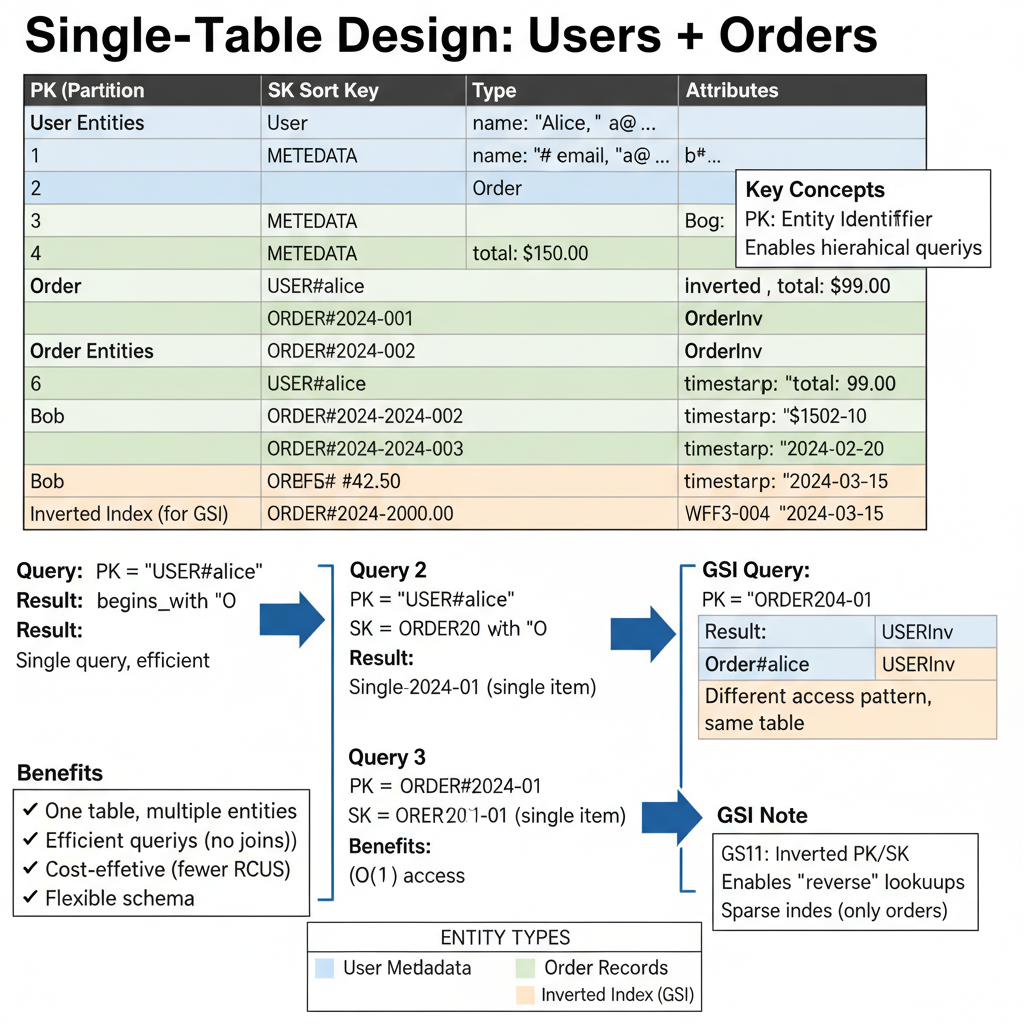
Example: Users and Orders in one DynamoDB table using composite keys (PK/SK pattern)
Understanding the Pattern:
PK (Partition Key) |
SK (Sort Key) |
Type |
Attributes |
|---|---|---|---|
|
|
User |
name: "Alice", email: "a@…" |
|
|
Order |
items: […], total: $99.00 |
|
|
Order |
items: […], total: $150.00 |
|
|
OrderInv |
Inverted for GSI queries |
Access Patterns:
1. Get user + all orders: Query: PK = "USER#alice" AND SK begins_with "ORDER"
2. Get specific order: Query: PK = "USER#alice" AND SK = "ORDER#2024-001"
3. List all orders (GSI): Query: PK begins_with "ORDER#"
Benefits: ✅ No joins needed ✅ Cost-effective ✅ Flexible schema ✅ High performance
Rick Houlihan's Key Insight: "The relational mindset is the #1 mistake with DynamoDB. Think in access patterns, not entities. One table can serve your entire application." Note: Generate this diagram using specifications in
docs/img/DIAGRAM_SPECIFICATIONS.md
Performance Optimization
- High-Cardinality Keys: Distribute writes evenly to avoid hot partitions—monitor with Contributor Insights (Houlihan recommendation).
- Batch Operations: Use BatchGetItem/BatchWriteItem for efficiency; implement retries with exponential backoff.
- DAX for Reads: Add in-memory caching for microsecond latency on read-heavy apps.
- Query vs. Scan: Always prefer Query; Scans are anti-patterns for production (DeBrie warning).
Security and Compliance
- Encryption & Access Control: Default encryption at rest; use IAM condition keys for row-level security (e.g., based on user ID).
- PITR and Backups: Enabled by default in FsCDK—essential for compliance (e.g., GDPR, HIPAA).
- Private Networking: Route traffic via VPC endpoints to avoid public internet exposure.
Cost Management
- On-Demand Mode: FsCDK default—pay only for what you use, ideal for variable traffic (DeBrie fave).
- TTL Automation: Expire data to cut storage costs; combine with Standard-IA for archives.
- Index Optimization: Use INCLUDE projections sparingly; delete unused GSIs via metrics analysis.
Reliability Engineering
- Global Tables: For multi-region HA and low-latency reads.
- Streams Integration: Capture changes for auditing, replication, or triggering Lambdas.
- Monitoring Setup: Alarm on ThrottledRequests and SystemErrors; use X-Ray for tracing.
Operational Checklist
Before deploying a DynamoDB table: 1. Model Access Patterns: Document all Query/Scan needs; validate with NoSQL Workbench. 2. Key Design Review: Ensure partition keys have 1000+ unique values; test for hotspots. 3. Index Audit: Justify each GSI/LSI; specify projections to minimize costs. 4. Security Scan: Confirm IAM policies, encryption, and PITR; add VPC endpoints if needed. 5. Cost Projection: Estimate RCUs/WCUs; prefer on-demand unless traffic is predictable. 6. TTL Configuration: Set for any time-bound data (e.g., sessions expire after 30 days). 7. Monitoring Setup: Enable Contributor Insights; create alarms for 80% capacity usage. 8. Test Thoroughly: Load test with realistic data; verify error handling and retries. 9. Documentation: Record schema, access patterns, and rationale in your repo.
Run this checklist for every new table or major schema change to align with expert standards.
Billing Modes
PAY_PER_REQUEST (On-Demand)
- No capacity planning required
- Pay per request
- Great for unpredictable workloads
- No minimum fees
- Automatically scales
PROVISIONED
- Pre-provision read/write capacity
- Lower cost for consistent workloads
- Requires capacity planning
- Can use auto-scaling
- Reserved capacity available for further savings
Stream View Types
- KEYS_ONLY: Only key attributes
- NEW_IMAGE: Entire item after modification
- OLD_IMAGE: Entire item before modification
- NEW_AND_OLD_IMAGES: Both before and after (recommended)
📚 Learning Resources from DynamoDB Experts
Alex DeBrie - The DynamoDB Authority
Essential Reading & Books:
- *The DynamoDB Book* - The definitive 300+ page guide to DynamoDB (highly recommended!)
- *DynamoDB Guide* - Free comprehensive online guide
- Single-Table Design in DynamoDB - Advanced data modeling pattern
- DynamoDB Strategies for One-to-Many Relationships - Essential modeling patterns
- Secondary Indexes in DynamoDB - GSI and LSI explained
Real-World Examples:
- DynamoDB Design Patterns - Common application patterns
- DynamoDB Filter Expressions - When and how to use filters
- DynamoDB Condition Expressions - Atomic operations and constraints
Rick Houlihan - AWS Principal Engineer (Former)
Legendary re:Invent Sessions: - Advanced Design Patterns (2019) - Master class in single-table design (most-watched DynamoDB talk!) - Advanced Design Patterns (2018) - Original advanced patterns session - Data Modeling with DynamoDB (2017) - Fundamentals of NoSQL data modeling - Advanced Design Patterns (2020) - Latest patterns and best practices
Key Concepts from Rick:
- Single-table design - Store all entities in one table for optimal performance
- Composite keys - Use concatenated values for flexible queries
- Inverted indexes - Create reverse relationships with GSIs
- Adjacency lists - Model hierarchical and graph relationships
- Sparse indexes - GSIs on optional attributes for efficient filtering
AWS Official Documentation
Getting Started:
- DynamoDB Developer Guide - Official complete documentation
- DynamoDB Core Components - Tables, items, attributes
- Primary Keys - Partition and sort keys explained
Best Practices:
- DynamoDB Best Practices - Official AWS recommendations
- Partition Key Design - Avoid hot partitions
- Sort Key Design - Query optimization strategies
- GSI Best Practices - When and how to use indexes
Advanced Features:
- DynamoDB Streams - Change data capture
- DynamoDB Transactions - ACID transactions across items
- Time To Live (TTL) - Automatic item expiration
- Global Tables - Multi-region replication
Data Modeling Deep Dives
Single-Table Design:
- Why Single-Table? - Benefits and trade-offs
- Single-Table Design Patterns - AWS blog post
- When NOT to Use Single-Table - Trade-offs to consider
Access Pattern Design:
- Start with Access Patterns - Design process walkthrough
- Query vs Scan - Why you should avoid scans
- Composite Sort Keys - Enable range queries
Relationship Patterns:
- One-to-Many Relationships - Three common patterns
- Many-to-Many Relationships - Adjacency list pattern
- Hierarchical Data - Tree structures in DynamoDB
Performance Optimization
Capacity Planning:
- Read/Write Capacity Modes - On-demand vs provisioned
- Auto Scaling - Scale capacity automatically
- DynamoDB Pricing - Understanding costs
- Cost Optimization - Strategies to reduce spend
Query Optimization:
- Efficient Queries - Use Query instead of Scan
- Projection Expressions - Reduce data transfer
- Batch Operations - BatchGetItem and BatchWriteItem
- Parallel Scans - When you must scan
DynamoDB Accelerator (DAX):
- DAX Overview - Microsecond read latency
- When to Use DAX - Read-heavy workloads
- DAX vs ElastiCache - Choosing the right cache
Security & Operations
Security Best Practices:
- DynamoDB Encryption - Encryption at rest (default)
- IAM Policies for DynamoDB - Fine-grained access control
- VPC Endpoints - Private connectivity
- DynamoDB and HIPAA - Compliance considerations
Monitoring & Troubleshooting:
- CloudWatch Metrics - Monitor table performance
- CloudWatch Contributor Insights - Find hot keys
- X-Ray Integration - Trace DynamoDB operations
- Common Error Messages - Throttling, capacity, etc.
Backup & Disaster Recovery:
- Point-in-Time Recovery - Continuous backups
- On-Demand Backups - Manual snapshots
- Global Tables - Multi-region disaster recovery
Video Tutorials
Beginner to Intermediate:
- DynamoDB Fundamentals - AWS tutorial for beginners
- DynamoDB Core Concepts - Keys, indexes, and queries
- Single-Table Design Explained - Visual walkthrough
Advanced:
- Rick Houlihan's Advanced Patterns - Must-watch for advanced users
- Data Modeling Workshop - Hands-on modeling session
- DynamoDB Streams Deep Dive - Event-driven patterns
Community Tools
Data Modeling Tools:
- NoSQL Workbench - Official data modeling tool from AWS
- DynamoDB Toolbox - Jeremy Daly's single-table library
- Dynobase - DynamoDB GUI client and data browser
Local Development:
- DynamoDB Local - Run DynamoDB on your laptop
- LocalStack - Full AWS cloud emulator
- DynamoDB Admin - Web GUI for local development
Testing & Migration:
- AWS Data Pipeline - Import/export data
- AWS Database Migration Service - Migrate from other databases
- PartiQL - SQL-compatible query language for DynamoDB
FsCDK Integration Highlights
FsCDK makes best practices effortless with defaults like on-demand billing and PITR, while supporting advanced features like custom GSIs. See the examples above for production patterns.
<summary>Creates an AWS CDK Stack construct.</summary>
<param name="name">The name of the stack.</param>
<code lang="fsharp"> stack "MyStack" { lambda myFunction bucket myBucket } </code>
<summary>Creates a DynamoDB table configuration.</summary>
<param name="name">The table name.</param>
<code lang="fsharp"> table "MyTable" { partitionKey "id" AttributeType.STRING billingMode BillingMode.PAY_PER_REQUEST } </code>
<summary>Sets the partition key for the table.</summary>
<param name="config">The current table configuration.</param>
<param name="name">The attribute name for the partition key.</param>
<param name="attrType">The attribute type (STRING, NUMBER, or BINARY).</param>
<code lang="fsharp"> table "MyTable" { partitionKey "id" AttributeType.STRING } </code>
<summary>Sets the sort key for the table.</summary>
<param name="config">The current table configuration.</param>
<param name="name">The attribute name for the sort key.</param>
<param name="attrType">The attribute type (STRING, NUMBER, or BINARY).</param>
<code lang="fsharp"> table "MyTable" { partitionKey "userId" AttributeType.STRING sortKey "timestamp" AttributeType.NUMBER } </code>
<summary>Creates global secondary indexes for a DynamoDB table.</summary>
<param name="name">The index name.</param>
<code lang="fsharp"> globalSecondaryIndex "my-index" { partitionKey "gsiPk" AttributeType.STRING sortKey "gsiSk" AttributeType.NUMBER projectionType ProjectionType.ALL } </code>
<summary>Sets the partition key for the Global Secondary Index (GSI).</summary>
<param name="config">The current global secondary index configuration.</param>
<param name="attrName">The attribute name for the partition key.</param>
<param name="attrType">The attribute type (STRING, NUMBER, or BINARY).</param>
<code lang="fsharp"> globalSecondaryIndex "my-index" { partitionKey "gsiPk" AttributeType.STRING } </code>
<summary>Sets the sort key for the Global Secondary Index (GSI).</summary>
<param name="config">The current global secondary index configuration.</param>
<param name="attrName">The attribute name for the sort key.</param>
<param name="attrType">The attribute type (STRING, NUMBER, or BINARY).</param>
<code lang="fsharp"> globalSecondaryIndex "my-index" { sortKey "gsiSk" AttributeType.NUMBER } </code>
<summary>Sets the Time-to-Live attribute for automatic item expiration.</summary>
<param name="config">The current table configuration.</param>
<param name="attributeName">The attribute name that stores the TTL timestamp (Unix epoch seconds).</param>
<code lang="fsharp"> table "MyTable" { partitionKey "id" AttributeType.STRING timeToLive "expiresAt" } </code>
<summary>Creates local secondary indexes for a DynamoDB table.</summary>
<param name="name">The index name.</param>
<code lang="fsharp"> localSecondaryIndex "my-index" { sortKey "lsiSk" AttributeType.NUMBER projectionType ProjectionType.ALL nonKeyAttributes [ "lsiNonKey1"; "lsiNonKey2" ] } </code>
<summary>Sets the sort key for the Local Secondary Index (LSI).</summary>
<param name="config">The current local secondary index configuration.</param>
<param name="attrName">The attribute name for the sort key.</param>
<param name="attrType">The attribute type (STRING, NUMBER, or BINARY).</param>
<summary>Sets the projection type for the GSI.</summary>
<param name="config">The current global secondary index configuration.</param>
<param name="projType">The projection type (ALL, KEYS_ONLY, or INCLUDE).</param>
<code lang="fsharp"> globalSecondaryIndex "my-index" { projectionType ProjectionType.ALL } </code>
<summary>Specifies additional non-key attributes to include in the GSI projection.</summary>
<remarks>Only used when <c>projectionType</c> is <c>INCLUDE</c>.</remarks>
<param name="config">The current global secondary index configuration.</param>
<param name="attrs">The list of non-key attribute names to include.</param>
<code lang="fsharp"> globalSecondaryIndex "my-index" { projectionType ProjectionType.INCLUDE nonKeyAttributes [ "status"; "createdAt" ] } </code>
<summary>Configures CloudWatch Contributor Insights for the table.</summary>
<param name="config">The current table configuration.</param>
<param name="enabled">Whether to enable contributor insights.</param>
<code lang="fsharp"> table "MyTable" { partitionKey "id" AttributeType.STRING contributorInsightsEnabled true } </code>
<summary>Sets the table class for cost optimization.</summary>
<param name="config">The current table configuration.</param>
<param name="tableClass">The table class (STANDARD or STANDARD_INFREQUENT_ACCESS).</param>
<code lang="fsharp"> table "MyTable" { partitionKey "id" AttributeType.STRING tableClass TableClass.STANDARD_INFREQUENT_ACCESS } </code>
<summary>Configures CloudWatch Contributor Insights for the table.</summary>
<param name="config">The current table configuration.</param>
<param name="enabled">Whether to enable contributor insights.</param>
<code lang="fsharp"> table "MyTable" { partitionKey "id" AttributeType.STRING contributorInsightsEnabled true } </code>
<summary>Enables DynamoDB Streams for the table.</summary>
<param name="config">The current table configuration.</param>
<param name="streamType">The stream view type (KEYS_ONLY, NEW_IMAGE, OLD_IMAGE, or NEW_AND_OLD_IMAGES).</param>
<code lang="fsharp"> table "MyTable" { stream StreamViewType.NEW_AND_OLD_IMAGES } </code>
<summary>Sets the removal policy for the table.</summary>
<param name="config">The current table configuration.</param>
<param name="policy">The removal policy (DESTROY, RETAIN, or SNAPSHOT).</param>
<code lang="fsharp"> table "MyTable" { removalPolicy RemovalPolicy.DESTROY } </code>
<summary>Sets the billing mode for the table.</summary>
<param name="config">The current table configuration.</param>
<param name="mode">The billing mode (PAY_PER_REQUEST or PROVISIONED).</param>
<code lang="fsharp"> table "MyTable" { billingMode BillingMode.PAY_PER_REQUEST } </code>
<summary>Enables or disables point-in-time recovery.</summary>
<param name="config">The current table configuration.</param>
<param name="enabled">Whether point-in-time recovery is enabled.</param>
<code lang="fsharp"> table "MyTable" { pointInTimeRecovery true } </code>